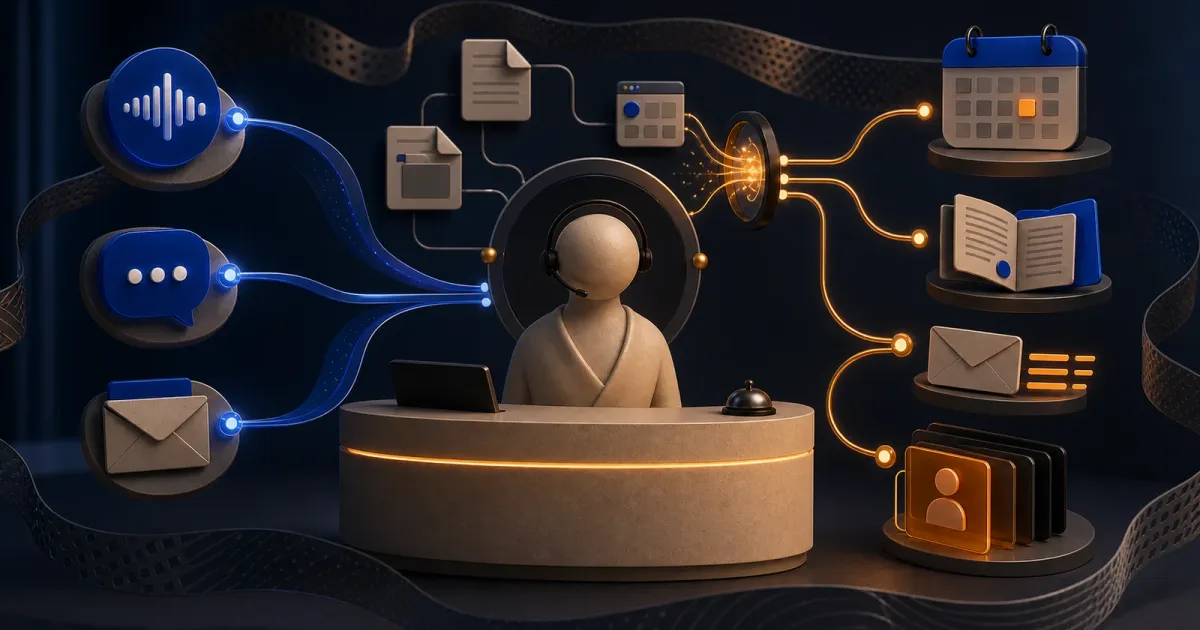
I originally built Zue AI Receptionist as a standalone product I could sell to businesses, not as a chatbot demo. A company would add a script and stylesheet to its website, pass one app ID, and get a small Ask AI button overlaid in a corner. A visitor could open it and ask anything about the business. If the conversation showed real interest, the receptionist would ask one question at a time, learn what the visitor needed, check the owner’s calendar, and book a call without sending them through a lead form.
The visible product was one button. The actual project was everything required for that button to behave like a competent employee across chat, email, voice, knowledge, scheduling, and the sales handoff. A business owner could upload documents, crawl a website, correct the extracted knowledge, inspect every conversation and email thread, see appointments, and open a scored lead with notes drawn from that person’s history across channels. The model was the most obvious part of the product and nowhere near the largest part of the work.
I built this in 2024, before a tool-using agent became the default pattern for every AI product demo. Looking back, it is the first project where all the parts of my engineering practice became inseparable: product design, frontend work, model and prompt design, retrieval, queues, storage, email protocols, voice infrastructure, and the operational interface a business owner would need to trust any of it.
One script tag had to disappear into somebody else’s website
The adoption constraint dictated the frontend before I wrote a line of the dashboard. I could not ask a business to rebuild its website around my product, install a React package, or maintain an integration. The widget had to arrive as ordinary browser assets and leave the host application alone.
I wrote it in Preact and compiled it as a single IIFE with one global surface: mount(container, app_id). The installation snippet loads the JavaScript and stylesheet, creates a container after the DOM is ready, and mounts the receptionist with the business’s public app ID. It works whether the host is WordPress, Squarespace, Framer, Next.js, or plain HTML because the contract stops at the DOM. The dashboard even asks a nontechnical owner what built their site and opens ChatGPT with their exact snippet and stack already inserted, so the last mile of installation becomes a tailored set of instructions instead of a generic documentation page.
I chose Preact to keep the embedded surface light, but “lightweight” here is more about the integration contract than pretending the final bundle stayed microscopic. Voice, Markdown rendering, animation, icons, and the compiled theme system all added weight over time. The thing I protected was the host’s mental overhead: one script, one stylesheet, one app ID, one mount call.
Customization was split into two speeds. Colors, translucent surfaces, message bubbles, and widget position were compiled into per-business DaisyUI themes, selected by setting the app ID as data-theme. The business name, enabled languages, and localized opening messages were fetched live when the widget mounted. That let the first paint use an existing visual identity while conversational settings could change without changing the embed contract.
The resting state was deliberately modest: a glassy Ask AI button, not a miniature website fighting for attention. Opening it revealed a native dialog with the business name, message history, one text box, language selection, and a voice-call control. There were no categories to choose and no required contact fields. The opening invitation was simply: ask anything about this business.
The receptionist’s first job was to be curious
The prompt took more iteration than most of the interface. A conventional support bot waits for a question, finds an answer, and stops. I wanted the opposite behavior: be useful immediately, but keep enough curiosity to understand who is asking and why.
The system prompt tells the receptionist to learn the visitor’s background, needs, motivations, pain points, and goals without revealing that it is assessing fit against the business’s ideal customer profile. It adapts its tone to the visitor, asks no more than one question in a response, and only nudges toward a call when the conversation shows interest. That one-question rule mattered. A model left to its instincts will happily produce a five-part intake questionnaire disguised as a friendly message. Limiting it to one question keeps the exchange feeling like text messages instead of a form with better typography.
The assistant had three tools: search the knowledge base, check calendar availability, and book an appointment. That was enough. The model handled the fuzzy part, including understanding intent, deciding when more context was needed, and phrasing the next question. Typed application code handled the contracts. Calendar calls required a local wall-clock time and an IANA timezone, and the backend converted that to UTC. Booking required a name, email, and short purpose. The model could decide that a meeting was appropriate, but it could not improvise the contract for the side effect.
Everything happened in the conversation. If someone asked a specific question, the receptionist searched. If they showed interest but had not proposed a time, it checked availability and offered real slots. If they chose one, it booked through Cal.com and let Cal.com deliver the invitation and meeting link. The visitor never had to leave the thread to find a scheduling page or repeat the context in a form.
I designed the operator’s side around outcomes, not AI machinery
The dashboard begins with Leads, then Appointments, Email, Knowledge, Conversations, Settings, installation, and a live demo. There is no navigation item for embeddings, model runs, tool traces, or prompt versions. That restraint is one of the product decisions I like most in hindsight. A business owner does not want to operate an AI stack. They want to know who is interested, what was said, what got booked, and whether the receptionist knows the right things.
Leads are the home screen and sort by score. Open one and the dashboard shows the person’s name, email, score, and concise sales notes, then links directly to every website conversation, email thread, and appointment associated with that address. Email became the practical join key for a compact CRM, centered on the questions that mattered to a small business: who this person is, how interested they appear, what they care about, and every interaction that produced that judgment.
I kept the underlying record one click away. Conversation and email lists use short summaries so an owner can scan activity, but their detail views show the complete exchange with timestamps and thread IDs. The owner can read exactly what the customer said and exactly what the assistant answered. I did not expose hidden reasoning or turn the dashboard into a model observability console. The audit surface is the customer-facing record, because that is what the business is responsible for.
The same principle carried into the knowledge base. A document is not a mysterious green checkmark after upload. It moves through Learning, Ready, or Failed. The owner can open a short-lived link to the original file, inspect the extracted Markdown, correct it in a large editor, or delete it. Website learning is page-level: every crawled URL appears with its status, source, timestamp, and content preview, and each extracted page can be edited or removed independently. The retrieval machinery stays behind the product, but the business truth it operates on remains visible and correctable.
Onboarding translates the owner’s vocabulary into the system’s configuration. I ask for the business name, a real description, the ideal customer profile, a website, documents, Cal.com access, a logo, and two colors. The website crawl can start before onboarding finishes. The calendar key is not accepted merely because it looks plausible; the dashboard asks Cal.com for real availability and requires at least one returned slot. At the end, the owner lands on the installation snippet. The sequence is the product in miniature: explain the business, teach the receptionist, connect the calendar, apply the brand, and put it on the website.
Cloudflare was the control plane, not the model provider
The backend is one Hono application running as a Cloudflare Worker with three entry modes: HTTP requests, queue consumption, and scheduled work. The same deployment coordinates website chat, inbound email, document and webpage ingestion, dashboard APIs, scheduling, voice calls, fine-tuning experiments, seven queues, and a six-hour job that imports AI Gateway logs.
I used the Cloudflare stack as a set of specialized state primitives. D1 held conversations, leads, documents, scraped pages, email threads, and detailed model-request logs. KV held tenant settings, prompt bundles, calendar credentials, chunks, page images, and intermediate OCR output. R2 held original files and temporary document views. Vectorize stored semantic indexes. A Durable Object owned live voice WebSocket state. Queues separated page OCR, document learning, deletions, webpage ingestion, translation, and conversation and email logging from the request that a user was waiting on.
The organizing identity was app_id. It selected the business prompt, settings, calendar, R2 prefix, D1 rows, Meilisearch index, Vectorize namespace, public widget theme, and routed email address. That one value let the widget remain public and simple while the Worker resolved it into everything specific to a business.
The asynchronous boundaries mattered because almost every interesting operation was too slow or too failure-prone to hide inside one request. A chat answer should not wait for the conversation to be summarized, contact details extracted, and the lead rescored. A file upload should not hold a browser connection open while dozens of page images move through OCR. The Worker returned the interaction, then the queues turned it into durable operational state the dashboard could show later.
Retrieval was recall first, relevance second
I built the RAG system from scratch because I wanted one knowledge layer that chat, email, and voice could all use. The retrieval path was deliberately hybrid. A question runs against semantic search in Vectorize and lexical search in a tenant-specific Meilisearch index at the same time. I union the returned chunk keys, remove duplicates, hydrate the canonical text from KV, and send the combined candidates to Voyage for reranking. I never tried to invent a fragile equation that made a keyword score and a vector distance pretend to be comparable. Each retrieval system maximized recall in the way it was good at, then the reranker made the final relevance decision.
The chunks themselves carried more context than a normal splitter produces. Before embedding a fragment, GPT-4o mini wrote exactly one sentence situating it inside the source document. That sentence was prepended to the raw text, and the same enriched version went into both Meilisearch and Vectorize. An isolated paragraph that says “it is available on the premium plan” is nearly useless. A paragraph preceded by one sentence explaining which product and section it came from is much easier for lexical search, embeddings, and the eventual answer model to use correctly. I paid a small model call at ingestion time to make every future retrieval better.
Document ingestion was its own pipeline. PDFs, Word files, and PowerPoint decks were rendered into page images. A vision model extracted Markdown, a second visual pass reviewed the extraction against the page, and GPT-4o mini applied the requested corrections. The OCR layer had a fallback ladder across several vision models because document pages fail in wonderfully inconsistent ways. Excel files took a separate conversion path. Text, Markdown, CSV, MDX, and JSON could skip the visual route.
I also designed a large-document mode rather than pretending every file fit in one context window. Under a 100,000-token threshold, chunks could be situated against the full document. Above it, pages were learned independently, but all page summaries were combined and supplied as shared context so each page still had a rough view of the whole. Website ingestion followed the same philosophy through Firecrawl: crawl the site, clean each page, store the source, and make the extracted text editable in the dashboard.
The important product payoff was not “we use RAG.” It was that a business owner could drop in the messy material they already had, including scans and office files, watch it become searchable knowledge, and correct the machine’s interpretation without knowing what an embedding was.
Email had to behave like email, not chat in another route
Each tenant received an address such as receptionist_<app_id>@mail.zue.ai. During onboarding, the backend created a Cloudflare Email Routing rule that sent matching mail to an email-reading Worker. Parsed messages then entered the same receptionist brain and knowledge layer as website chat.
Making the model answer was the easy part. The work was preserving the behavior people expect from an email thread. I reconstructed quoted history into alternating messages, used Message-ID and References to recover thread identity, restored timestamps from the saved record, inferred a timezone from the sender’s Date header, and kept the reply concise. The assistant could search the knowledge base, check availability, and book through the same tools as chat. Resend delivered HTML and plaintext replies with In-Reply-To and References headers so the response remained in the existing thread instead of becoming another orphaned message.
Email also made the cross-channel memory useful. Before generating a reply, the backend saved and rescored the thread. The email prompt could then include the latest lead notes, which meant a prospect who had already explained their budget, timeline, or pain point did not meet a receptionist with amnesia on the next message. The entire thread remained visible in the dashboard alongside their chat history and bookings.
The CRM emerged from the conversation stream
I did not ask visitors to fill a lead form before earning an answer. Instead, the conversation logger ran asynchronously after chat turns. A small model wrote a five-word summary and extracted a name and email when they appeared naturally. Once there was an email address, the scoring system loaded the person’s earlier website conversations and email threads, combined them with the business description and ideal customer profile, and produced two things: a 0-100 purchase-likelihood score and a short set of notes for the sales team.
The notes were asked to capture the details that matter before a call: product interest, budget, timeline, motivations, and pain points. The score was longitudinal rather than attached to one dramatic message. Every new interaction could revise the picture, and the dashboard always linked the result back to the source conversations. That is what made this feel like a small CRM rather than analytics pasted onto a chatbot.
This was also where product and prompt design reinforced each other. The receptionist was instructed to ask one useful question at a time because those answers made the immediate conversation better. The same answers accumulated into better qualification later. The visitor experienced curiosity; the owner received structured sales context. One interaction served both sides without turning into an interrogation.
I trained the behavior, not just the vocabulary
The English website assistant did not run a generic frontier model with an enormous prompt forever. I built a self-play pipeline to teach a smaller model the narrow behavior I wanted.
For each synthetic business, I generated detailed visitor personas with different backgrounds, writing styles, goals, and levels of fit. One model played the visitor. A stronger teacher model played the receptionist under the same business context, prompt, and tool definitions as the product. They talked for up to twelve turns, and the pipeline kept either the final receptionist response or the tool-use decision that ended the exchange. I converted the Anthropic conversation and tool calls into OpenAI fine-tuning rows, trained a GPT-4o mini model on the resulting demonstrations, and deployed that model for English chat.
Narrowing the task is what made the economics work. I was not trying to train a generally smarter model. I wanted one small model to be unusually good at this particular tone, questioning rhythm, qualification behavior, and decision to search or book. Frontier-model outputs became demonstrations; the smaller model learned the receptionist. That original pipeline later became the starting point for my standalone finetuning toolkit, where I generalized the self-play and distillation machinery beyond this one product.
This project was also where I first built my own provider-agnostic model layer. Different workloads went to different models: the fine-tuned GPT-4o mini for English chat, GPT-4o for other languages, Claude Haiku for email, Qwen for cleaning scraped pages, Workers AI for summaries and compression, Hyperbolic vision models for OCR, and Voyage for embeddings and reranking. Cloudflare coordinated the requests and logged them, but it did not dictate the intelligence. I later wrote about the abstraction ladder this started in The same API in a fancier coat.
Voice forced me to care about interruption
I built voice across two paths. The widget had a one-button Vapi call surface with explicit connecting and active states, a timeout, and volume-reactive feedback. The Vapi assistant configuration split speech recognition, the fine-tuned LLM, and synthesis across Deepgram, my model behind Cloudflare AI Gateway, and Rime, with the same search and calendar tools as text. The voice prompt was rewritten for speech: extremely short answers, one question at a time, natural filler words, and no Markdown that a caller would have to listen to. Voice, pacing, and optional background ambience became product decisions rather than incidental model settings.
The phone path used Twilio Media Streams and OpenAI Realtime. A Durable Object sat between the Twilio socket and the model socket, forwarding G.711 audio in both directions and routing function calls through the same knowledge and calendar layer. The detail I care about most is interruption. When the caller started speaking over the assistant, the backend cancelled the current response, truncated the portion of the model’s message the caller had not heard, and cleared Twilio’s playback buffer. Without all three, the transcript, model context, and audio the person actually heard disagree with each other. Voice stops feeling intelligent the moment it talks through you or remembers words it never finished saying.
Building both paths made one point very clear: voice is not text chat with a microphone attached. The system has to coordinate audio transport, turn detection, interruption, tool calls, and conversation state in real time. That work later gave me a much stronger foundation for the voice-operations product I built as IcePhone.
The code is also a record of what I would do differently now
What I like most about Zue is that none of its interesting parts lived in isolation. The prompt only worked because retrieval could give it reliable business context. Retrieval only worked because ingestion could turn websites, office files, and scanned pages into inspectable text. Lead scoring only meant something because chat and email were joined into a longitudinal history. Scheduling only felt natural because the receptionist gathered context conversationally before calling the calendar tool. The dashboard made all of those systems legible to the person actually responsible for the customer relationship.
Reading the code now, I would keep that product thesis and make some of the system boundaries more explicit. Document ingestion would be a durable state machine, with an explicit completion barrier between parallel OCR and the learning stage. Every transition would be idempotent and observable. The expensive visual extraction could still happen concurrently, but the document itself would have one authoritative lifecycle rather than asking individual queue messages to infer it.
I would still choose Preact and preserve the one-script-tag installation, because reducing the customer’s integration work was the right constraint. I would package it as a Web Component with a Shadow DOM boundary so the widget could carry its entire visual system into an arbitrary website without inheriting or affecting the host page. The interface would stay the same; the contract around it would become stronger.
I would also formalize the channel-independent receptionist as its own layer. Chat, email, Vapi, and the realtime phone path already shared knowledge and calendar tools, but a typed conversation state, common tool registry, and small adapter for each channel would make that relationship structural. Tenant configuration, prompts, model selection, and voice provisioning would all describe one receptionist, regardless of where a customer happened to speak to it.
The other thing I would add from the beginning is an evaluation suite built beside the prompts. I iterated heavily on tone, question order, retrieval, qualification, and the moment when the agent should suggest a meeting. A fixed set of representative businesses and conversations would turn those judgments into repeatable tests: did it search when it should, ask one useful question, avoid inventing an answer, recognize buying intent, preserve an email thread, and call the calendar tool with the right arguments? The fine-tuning pipeline taught the model the behavior; an evaluation pipeline would make that behavior easier to evolve with confidence.
Those are changes to the boundaries, not to the ambition. The lightweight frontend still depended on a multi-tenant Cloudflare control plane, asynchronous queues, several storage systems, model routing, and a knowledge layer shared across channels. The product felt small at the point of use because the complexity had somewhere deliberate to go.
I set out to sell businesses an AI receptionist and ended up building a multi-tenant control plane, ingestion system, retrieval engine, email participant, voice runtime, scheduling layer, fine-tuning pipeline, mini CRM, embeddable product, and the dashboard that made all of it operable. That range was not accidental accumulation. Each layer existed because the receptionist eventually had to do something useful with the conversation, and because the business owner needed to see, understand, and trust what it had done.
For the visitor, Zue was a button that answered questions and could turn a useful conversation into a booked meeting. For the owner, it was a searchable record of conversations, emails, leads, appointments, and the knowledge behind every answer. For me, it became the project where product design, full-stack engineering, distributed systems, retrieval, model training, and conversational interface design finally met in one place.
Zue AI Receptionist is where I first learned the lesson that keeps showing up in my work: the impressive model behavior is usually the smallest part of a serious AI product. The real engineering begins when the answer has to be grounded, remembered, delivered through the right channel, converted into an action, and made visible to the person responsible for what happens next.